
Safety & harassment
Recognising social engineering: how account takeovers actually happen
Almost no one is hacked through clever code. They are talked into it. The recurring patterns behind account takeover scams, why intelligence is no defence, and the one habit that reliably works.
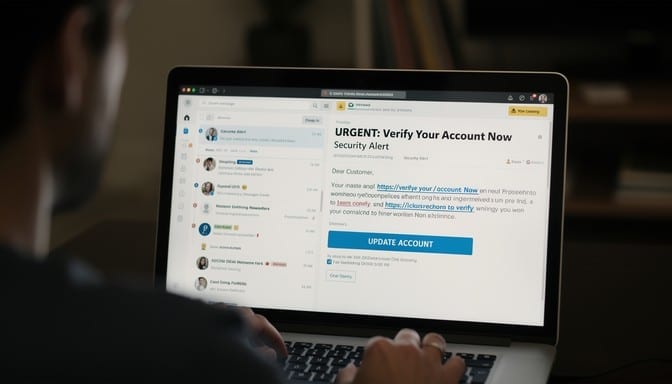
The mental image of being "hacked" involves someone breaking encryption. The reality is that the overwhelming majority of account compromises involve no technical exploit whatsoever. Someone was persuaded to hand over access.
This is worth internalising, because it changes what you should defend. Social engineering targets a person's judgement under pressure, and judgement under pressure is not a function of intelligence or technical skill. Security professionals fall for these attacks. The defence is procedural, not intellectual.
The structure every scam shares
Vary the story and the medium and you still find the same four components.
A pretext. A plausible reason for contact. Your bank's fraud team. A courier with a failed delivery. Your company's IT helpdesk. Someone from a platform's support team.
Authority or familiarity. Something that makes compliance feel natural — a spoofed caller ID, a logo, an email address one character off, or the hacked account of someone you know.
Urgency. The essential ingredient. A deadline, a threat, a closing window. Urgency exists to prevent verification, because verification defeats the attack. If you feel rushed, that is the attack.
An action. Read out a code. Click a link and sign in. Move money "to a safe account". Approve a prompt. Install a support tool.
Learn the structure rather than the individual stories. The stories change weekly; the structure has not changed in decades.
The patterns worth recognising
| Channel | Common pattern | Warning sign | Safer response |
|---|---|---|---|
| SMS | Delivery, bank, or account alert with a link | The message asks you to sign in, pay a fee, or share a code | Do not use its link or reply. Open the organisation's app or type its address yourself. |
| Invoice, shared document, or password-reset notice | Unexpected attachment, lookalike sender, or pressure to act now | Do not open the attachment or sign in from the message. Check through a site or contact you already trust. | |
| Call | Bank, police, or support agent says to move money or install a tool | They keep you on the line, demand secrecy, or ask for a code | Hang up. Call the published number from another phone if possible; never move money to a caller's account. |
| DM | Friend or support account asks for money, a code, or a login | Unusual urgency, a new link, or a request that does not fit the relationship | Stop replying and verify with the person through a separate, known channel. |
What to do when a message feels wrong
- Pause. Do not click, reply, approve a prompt, share a code, or move money while you are in the conversation.
- Verify independently. Contact the person or organisation using a number, app, or address you already know, not details supplied in the message.
- Keep useful evidence. Save the message, sender details, time, and any transaction reference before reporting or blocking it.
- Contain any exposure. If you shared a password or code, use the official site to secure the account and revoke unfamiliar sessions. Contact your bank immediately if money or payment details were involved.
If you already acted, use the recovery steps below; a quick report and account lock-down can limit further damage.
The one-time code request
The most common account takeover in existence, and the simplest.
The attacker has your username. They trigger a legitimate password reset, which sends you a genuine code. Then they contact you — as support, as the platform, as your bank — and ask you to confirm the code.
The code is real. The message asking for it is not.
The rule that covers every version of this: a one-time code is only ever typed into a page you navigated to, in a flow you started. Nobody legitimate will ever ask you to read one out or forward it. Not your bank, not the platform, not the police. The codes even say so in the message, which people read after the fact.
The compromised friend
A message from someone you know: they are stranded, they need money, or they want you to vote for them in a competition via a link. Or they simply ask you to receive a verification code "so I can get back into my account".
That last one is a classic account-takeover chain: your friend has already lost their account, and the scammer is using the trust to take yours next.
Defence: verify on a different channel. Call them. The inconvenience is the point — it breaks the attacker's control of the conversation.
The fake support agent
You post a complaint about a service publicly. Within minutes an account with a convincing name and avatar replies offering help, and moves you to a private channel.
Real support does not need your password, your recovery codes, or remote control of your machine. Real support does not initiate contact through a direct message after you complain publicly.
Defence: navigate to the company's site yourself and use its official support channel.
The bank's "safe account"
Someone calls, spoofing your bank's number, and says your account is compromised. To protect your money you must move it to a new "safe account" they provide.
No bank does this. Ever. Moving your own money is an authorised transaction, which is precisely why the technique is used: it is harder to reverse than a fraudulent one.
Defence: hang up. Wait five minutes — or call from a different phone, since a held line can persist. Ring the number printed on your card.
Prompt fatigue
You get repeated "Approve sign-in?" notifications, often overnight. The attacker already has your password and is gambling that you will eventually tap Approve to make it stop.
Defence: never approve a prompt you did not personally trigger. Repeated prompts mean your password is compromised — change it immediately.
The QR code
Increasingly used because a QR code hides its destination and people scan them without the scepticism they apply to links. Placed over legitimate codes on parking meters, restaurant tables, or posters.
Defence: check the URL your camera previews before opening it. Be suspicious of any physical code that looks like a sticker applied over something else.
The job offer and the interview task
Targeted at people who are looking for work and therefore motivated to comply. An attractive offer leads to a "skills assessment" requiring you to run code, or to onboarding paperwork collecting identity documents and bank details.
Defence: verify the company independently and never run unknown code on a machine that matters.
Why being clever does not protect you
These attacks do not test knowledge; they test whether they can catch you at a moment when you are busy, tired, worried, or expecting something similar. Everyone has such moments.
The distinguishing feature of people who avoid these attacks is not that they are more suspicious in general. It is that they have a rule they follow regardless of how the situation feels.
The rule
Verify out of band, on a channel you chose.
If contact arrives — call, text, email, DM — and asks for an action, do not act within that conversation. Independently reach the organisation using a number or address you already have. Hang up and call back. Type the domain yourself.
This single habit defeats nearly every attack described here, because all of them depend on keeping you inside a channel the attacker controls.
The corollary matters too: a legitimate organisation will never object. Anyone who pressures you against verifying, or says there is no time, has told you what they are.
Real-world message pattern library and refusal scripts
Social engineers rely on predictable psychological triggers. Memorize these four common formats and use the ready-made refusal scripts to interrupt the attack:
Pattern 1: The Urgent Bank Fraud Department Call
- The Hook: Caller ID shows your bank's real customer service number (spoofed). Caller states: "Fraudulent debit of $1,420 detected in Miami. To reverse the transaction, read me the six-digit code we just sent to your phone."
- The Reality: The attacker is attempting a password reset or wire authorization on your account and needs you to relay the incoming 2FA code.
- Refusal Script:
"I appreciate the alert. Per my security policy, I am hanging up now and calling the customer service number printed directly on the back of my debit card. Please note my account file." (Hang up immediately; do not wait for a reply).
Pattern 2: The "Help Me Recover My Account" Friend DM
- The Hook: A friend's compromised social account DMs you: "Hey! I'm locked out of my account and the app asks for 2 friends to verify. Can you send me the link you get via SMS so I can log in?"
- The Reality: They entered your phone number into a password reset or account recovery form. That link will grant them total control over your account.
- Refusal Script:
"Hey, I never share verification links or security codes by message. I'm going to call you on your regular cell number to make sure it's really you."
Pattern 3: The Suspended Account / Security Threat Email
- The Hook: "Your cloud account / domain / subscription will be permanently deleted within 24 hours due to non-compliance or billing failure. Click here to verify your identity."
- The Reality: A lookalike login page designed to harvest your credentials and session cookie.
- Refusal Script:
Do not reply and do not click links. Open a clean browser tab, manually type the platform's known URL (e.g.
google.comorapple.com), and inspect your account notification center directly.
Pattern 4: The Relative in an Emergency (WhatsApp / SMS)
- The Hook: "Hi Mom, I dropped my phone in water and this is my temporary number. I'm stranded and need $450 for a tow/ticket. Can you Zelle or Venmo it right away?"
- The Reality: Impersonation scam targeting parental panic.
- Refusal Script:
"I need to hear your voice before sending any funds. I am calling your old phone number right now." (Alternatively, ask a predetermined family challenge question: "What was the name of our childhood dog on Elm Street?").
Reducing the damage in advance
- Use a password manager. Beyond generating unique passwords, it will not autofill on a lookalike domain — it detects the phishing site that you might not.
- Use phishing-resistant second factors where it matters. See our guide to two-factor methods.
- Lock down your mobile account. Add a port-out PIN with your carrier to make SIM swapping harder.
- Separate your critical email address. An address used only for banking and account recovery, never given out publicly, is a small effort with real benefit.
If it has already happened
Move quickly and in this order:
- Change the password on the affected account, then on your email — that is the account that controls the rest.
- Revoke active sessions and connected apps. Attackers commonly add a persistence mechanism so a password change alone does not evict them.
- Check the recovery settings. Look for changed recovery emails, added phone numbers, new authenticator enrolments, or forwarding rules quietly sending copies of your mail elsewhere. This step gets skipped and it is how people get re-compromised.
- Contact your bank if any financial detail was exposed. Reporting quickly materially affects your chance of recovery.
- Report it. To the platform, and to your national fraud reporting body.
- Tell the people in your contacts. Their turn is next; a warning breaks the chain.
Finally — if it happened to you, skip the embarrassment. These attacks are engineered by people who do this full time, refined against millions of targets, and deployed at the moment you are least able to resist. Falling for one is not a character flaw. Staying quiet about it only helps the next attempt succeed.